AIDA64 Plugin
Disclaimer
This plugin is created and provided by ModBros, with no official affiliation to FinalWire Ltd (AIDA64).
The AIDA64 plugin for MoBro allows you to import all system metrics currently monitored by AIDA64 via shared memory.
Requirements
- AIDA64 must be installed and running on your system.
- Shared Memory must be enabled in AIDA64.
- The AIDA64 Plugin must be installed in MoBro.
Mandatory Settings
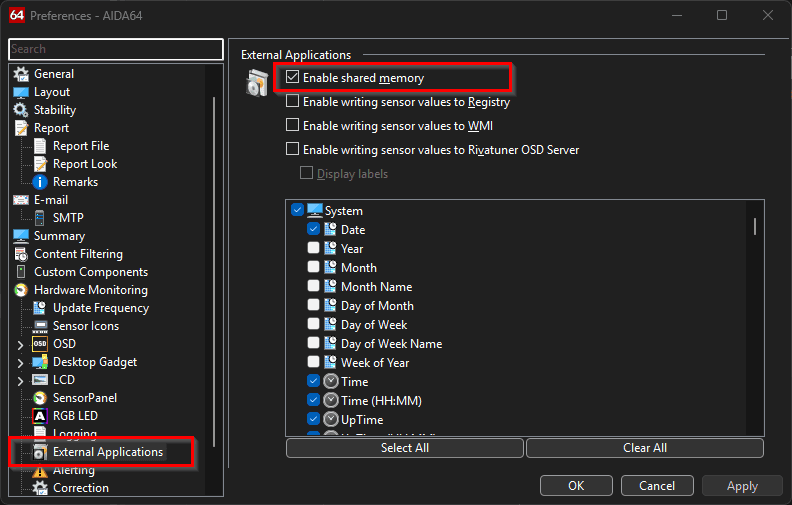
For MoBro to detect your AIDA64 data, you must enable the shared memory option within AIDA64:
- Open AIDA64.
- Go to Preferences.
- Navigate to External Applications in the left sidebar.
- Check the box for Enable shared memory.
- Click Apply or OK.
Troubleshooting
No metrics appearing in MoBro
- Check AIDA64 Version: Ensure you are using a version of AIDA64 that supports External Applications (most Extreme and Engineer editions do).
- Verify Shared Memory: Double-check that the "Enable shared memory" setting hasn't been disabled.
- Check the Plugins tab in MoBro to ensure the AIDA64 plugin is "Running".